NVMe Base for Raspberry Pi 5
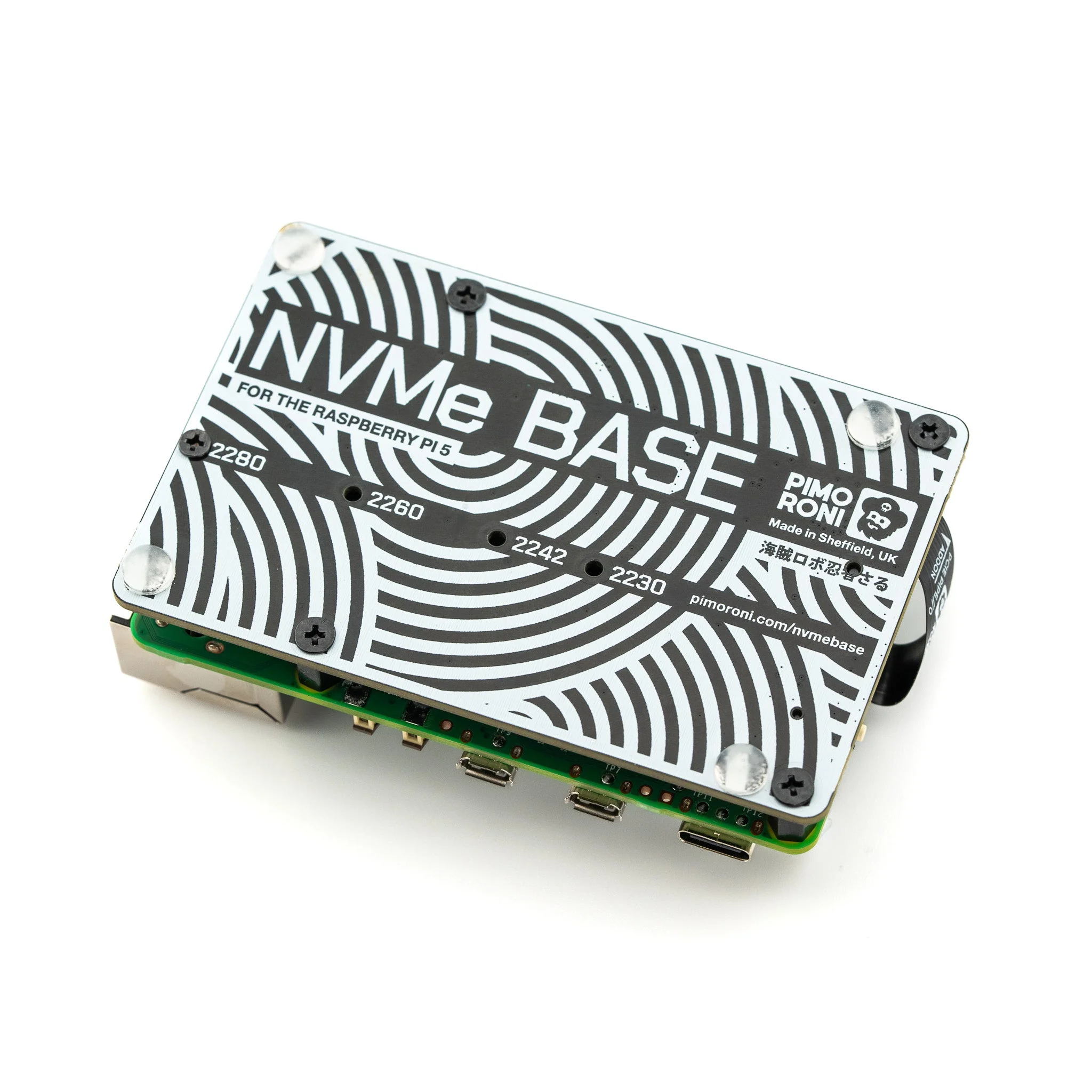
Add super-fast NVMe storage to your Raspberry Pi 5 with the Pimoroni NVMe Base. This PCIe extension board mounts underneath your Pi and accepts M-key NVMe SSDs in 2230 to 2280 form factors, delivering lightning-fast boot times and high IOPS for file servers, media centres, and NAS applications.
Designed following the official Raspberry Pi PIP PCIe connector standard, ensuring long-term compatibility with Raspberry Pi OS updates. The Pi 5 runs at PCIe 3.0 x1 speeds (experimental), achieving around 700–800 MB/s read and 350–450 MB/s write at peak.
Key Features
- M.2 NVMe Slot (M-Key) – Supports 2230, 2242, 2260, and 2280 SSDs
- PCIe x1 Connection – Via flat flex cable to Raspberry Pi 5
- Mounts Underneath – Compact form factor with rubber feet
- HAT Pass-Through – Long bolts included for stacking with a HAT
- PIP Standard Compliant – Official Raspberry Pi PCIe design guidelines
Setup
For the most hassle-free experience, ensure Raspberry Pi OS is up to date and firmware is version 2023-12-06 or newer.
Boot from NVMe:
- Update firmware to 2023-12-06 or newer
- Format the drive using Raspberry Pi Imager
- Run
sudo raspi-config - Select NVMe/USB boot under Advanced Options > Boot Order
- Reboot
Tested Compatible Drives
- AData Legend 700 / 800 / XPG SX8200 Pro
- Crucial P2 / P3 / P3 Plus
- Kingston KC3000
- Kioxia Exceria / Exceria G2
- Lexar NM620 / NM710
- Netac NV2000 / NV3000
- Sabrent Rocket 4.0 / Rocket Nano
- Samsung 980 / 980 Pro (500 GB / 1 TB)
- Team MP33
- WD Black SN750 SE
Ideal For
- NAS and file server builds
- Fast boot from NVMe storage
- Media centres and reverse proxies
- High IOPS workloads
Package Contents
- 1× NVMe Base PCB with M.2 Slot (M-Key)
- 1× PCIe Pipe Flat Flex Cable
- 4× Rubber Feet
- 1× M2 Bolt + 2× Nuts (SSD mounting)
- 4× 7 mm M2.5 Standoffs (base mounting)
- 8× Short M2.5 Bolts (base mounting)
- 4× Long M2.5 Bolts (HAT pass-through mounting)
Resources
Original: $31.95
-70%$31.95
$9.58Product Information
Product Information
Shipping & Returns
Shipping & Returns
Description
Add super-fast NVMe storage to your Raspberry Pi 5 with the Pimoroni NVMe Base. This PCIe extension board mounts underneath your Pi and accepts M-key NVMe SSDs in 2230 to 2280 form factors, delivering lightning-fast boot times and high IOPS for file servers, media centres, and NAS applications.
Designed following the official Raspberry Pi PIP PCIe connector standard, ensuring long-term compatibility with Raspberry Pi OS updates. The Pi 5 runs at PCIe 3.0 x1 speeds (experimental), achieving around 700–800 MB/s read and 350–450 MB/s write at peak.
Key Features
- M.2 NVMe Slot (M-Key) – Supports 2230, 2242, 2260, and 2280 SSDs
- PCIe x1 Connection – Via flat flex cable to Raspberry Pi 5
- Mounts Underneath – Compact form factor with rubber feet
- HAT Pass-Through – Long bolts included for stacking with a HAT
- PIP Standard Compliant – Official Raspberry Pi PCIe design guidelines
Setup
For the most hassle-free experience, ensure Raspberry Pi OS is up to date and firmware is version 2023-12-06 or newer.
Boot from NVMe:
- Update firmware to 2023-12-06 or newer
- Format the drive using Raspberry Pi Imager
- Run
sudo raspi-config - Select NVMe/USB boot under Advanced Options > Boot Order
- Reboot
Tested Compatible Drives
- AData Legend 700 / 800 / XPG SX8200 Pro
- Crucial P2 / P3 / P3 Plus
- Kingston KC3000
- Kioxia Exceria / Exceria G2
- Lexar NM620 / NM710
- Netac NV2000 / NV3000
- Sabrent Rocket 4.0 / Rocket Nano
- Samsung 980 / 980 Pro (500 GB / 1 TB)
- Team MP33
- WD Black SN750 SE
Ideal For
- NAS and file server builds
- Fast boot from NVMe storage
- Media centres and reverse proxies
- High IOPS workloads
Package Contents
- 1× NVMe Base PCB with M.2 Slot (M-Key)
- 1× PCIe Pipe Flat Flex Cable
- 4× Rubber Feet
- 1× M2 Bolt + 2× Nuts (SSD mounting)
- 4× 7 mm M2.5 Standoffs (base mounting)
- 8× Short M2.5 Bolts (base mounting)
- 4× Long M2.5 Bolts (HAT pass-through mounting)